



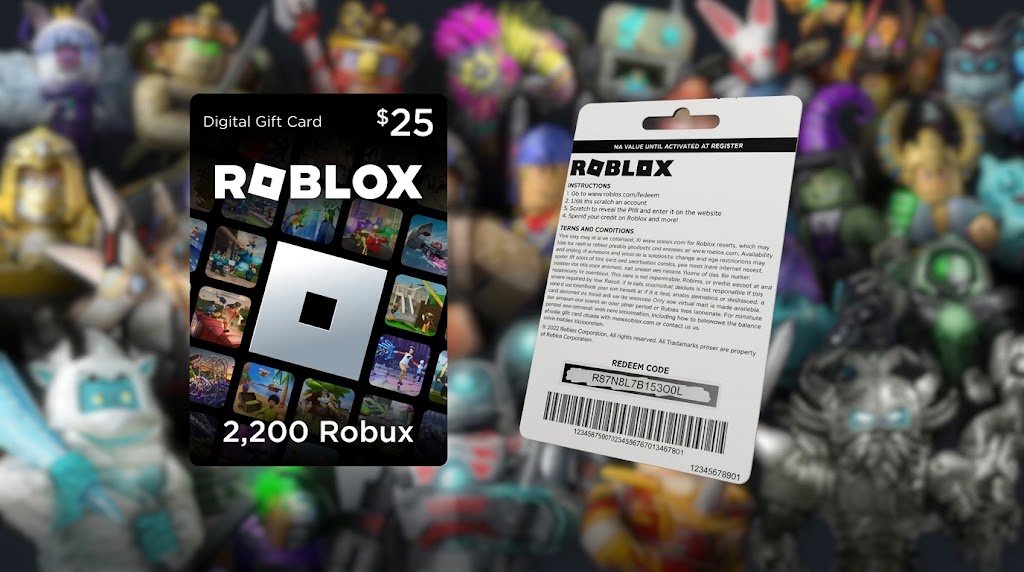
A Roblox Gift Card is a convenient way to add value to a Roblox account and use that value for Robux and other eligible Roblox services. Gift cards are popular with players, parents, and gift-givers because they provide a simple alternative to entering payment information directly into a Roblox account.
In 2026, Roblox gift cards can be purchased through Roblox and authorized retailers or distributors. Depending on the card and market, a gift card may provide Roblox Credit or, for certain specially marked cards, Robux directly. Roblox’s current terms state that gift cards obtained from unauthorized sellers or resellers may not be honored.
What Is a Roblox Gift Card?
A Roblox Gift Card is a prepaid card that can be redeemed through a Roblox account. For cards that are redeemed for Roblox Credit, the value is added to the account and can then be used for eligible Roblox purchases, including Robux and certain Roblox services.
Unlike a traditional debit or credit card, a Roblox Gift Card is not intended to function as a general payment card. Roblox’s terms explain that gift cards have no cash value, generally cannot be refunded or reloaded, and cannot be redeemed for cash except where required by law.
Gift cards can be especially useful when you want to give someone Roblox-related spending money without linking your own payment method to their account. They also allow the recipient to decide when and how to use the available value within the options provided by Roblox.
How Does a Roblox Gift Card Work?
When you redeem an eligible Roblox Gift Card, its value is generally added to your Roblox account as Roblox Credit. That credit is associated with the account used during redemption, so choosing the correct account before entering the code is important.
Roblox explains that Credit can be used to purchase Robux and other eligible Roblox services. The exact products, pricing, availability, and applicable taxes can change, so users should check the current Roblox purchase options when they are ready to spend their balance.
Some specially marked gift cards can instead be denominated in Robux and redeemed directly for the stated amount of Robux. This means it is important to check the specific card before assuming that every Roblox Gift Card works in exactly the same way.
How to Redeem a Roblox Gift Card in 2026
Redeeming a Roblox Gift Card is straightforward and normally takes only a few minutes. The standard redemption process is performed through a web browser rather than the regular Roblox mobile app or a game console.
First, open the official Roblox redemption page at Roblox.com/redeem and sign in to the Roblox account where you want the gift card value to be added. Once you are logged in, enter the PIN or code printed on your physical or digital gift card.
After entering the code, select Redeem. Roblox will display a confirmation when the credit or eligible item has successfully been added to the account.
Official Roblox Gift Card Redemption Page
It is worth checking the username before completing the redemption. Once the value has been applied to an account, moving it to another account may require contacting Roblox Support, and gift-card value is not generally transferable between accounts.
Can You Redeem a Roblox Gift Card on Mobile?
For most users, Roblox Gift Card redemption is handled through a web browser. Roblox states that the redemption option is not available in the standard Roblox mobile app or on consoles.
There is an exception for Samsung Galaxy users. According to Roblox Support, users on Samsung devices can open the Roblox mobile app, go to the More page, select the Redeem option, and enter their code directly in the app.
If you are using an iPhone, iPad, another Android device, PlayStation, Xbox, or another platform without the supported redemption feature, using a web browser is the safer option. You can sign in through the Roblox website and complete the redemption there.
How to Use Roblox Gift Card Credit
After redeeming a qualifying gift card, the value is stored as Roblox Credit on the account. This credit can be used for eligible Roblox purchases rather than functioning as ordinary cash.
To use your Roblox Credit toward Robux, sign in to the same account through a web browser and open the gift-card redemption or Robux purchase area. Roblox provides options for purchasing Robux using available Credit, with the available package depending on the balance in the account.
If your balance is large enough for a Robux package, you can select the applicable purchase option and confirm the transaction. Any remaining balance may stay in your Roblox Credit until you are ready to use it.
Roblox also provides an option for dealing with smaller remaining Credit balances that are not sufficient for a complete Robux package. Depending on the account and current options, users may see a Convert Credit to Robux or similar option that allows the remaining eligible balance to be converted.
How to Check Your Roblox Gift Card Balance
Checking your Roblox Gift Card balance is useful if you have already redeemed a card but are unsure how much Credit remains. The balance is associated with the Roblox account where the card was redeemed.
Roblox Support explains that you can check available Credit by signing into the correct account through a web browser and visiting the gift-card redemption page. Your available Credit should appear below the Redeem button when applicable. You can also find the balance through Billing Settings next to the Roblox Credit information.
Remember that Roblox Credit is not necessarily displayed on every account page. If you do not see a Credit balance, make sure you are signed into the account where the gift card was originally redeemed.
Can You Redeem More Than One Roblox Gift Card?
Yes. Roblox Support states that multiple gift cards can be redeemed, although the codes must be entered individually at the redemption page.
This can be useful when receiving several gift cards for a birthday, holiday, celebration, or other occasion. Instead of trying to combine physical cards before redemption, you can redeem each valid code separately into the same Roblox account.
However, it is important to keep your gift cards and redemption information secure until you are ready to use them. Roblox says it is not responsible for cards that are lost, stolen, damaged, or used without authorization under its applicable terms.
Do Roblox Gift Cards Expire?
Under Roblox’s current terms, Roblox Gift Cards do not expire, and there are no inactivity, maintenance, or service fees applied to the cards.
That does not mean you should share your card code publicly or leave the code unprotected. Anyone who obtains an unused gift-card code may potentially redeem it, so treat the PIN or digital code like valuable payment information until it has been safely redeemed.
Can You Use a Roblox Gift Card From Another Country?
Roblox Support states that Roblox codes can be redeemed worldwide, with the value converted to the applicable local currency when the gift card is redeemed for Roblox Credit.
The exact treatment can depend on the card, currency, and applicable regional terms. Roblox’s current terms explain that cards denominated in currencies other than the account’s applicable currency can be converted according to Roblox’s stated currency-conversion rules.
Because regional terms and pricing can change, checking Roblox’s current gift-card terms is recommended before purchasing a card specifically for someone in another country.
Roblox Gift Card vs. Robux
Although Roblox Gift Cards and Robux are closely connected, they are not always the same thing. A standard gift card that is redeemed for Credit gives you a balance that can subsequently be used for eligible purchases, including Robux.
Robux, on the other hand, is Roblox’s in-game currency. Once Credit has been used to purchase Robux, the resulting Robux can be used for eligible experiences, avatar-related purchases, and other features where Robux is accepted.
Certain specially marked gift cards may be redeemable directly for a stated amount of Robux. Therefore, always read the description on the particular card rather than assuming every card follows the same redemption method.
What If Your Roblox Gift Card Code Does Not Work?
A failed redemption does not necessarily mean the card is invalid. Roblox recommends checking the characters carefully because certain letters and numbers can look very similar when printed on a gift card.
For example, Roblox specifically recommends checking common substitutions such as zero and the letter O, one and capital I, two and Z, five and S, six and G or Q, and eight and B.
If carefully entering the code still produces an error, Roblox Support may ask for information such as the account username, purchase date and amount, place of purchase, gift-card PIN and serial number, receipt, images of the card, and an image of the error message.
Keeping your original receipt is therefore a good idea, particularly when purchasing a physical card as a gift.
How to Avoid Roblox Gift Card Scams
Because Roblox Gift Cards have monetary value, scammers may attempt to obtain unused codes through fake giveaways, phishing pages, fraudulent websites, or social-engineering messages. Never send an unused gift-card code to someone simply because they claim they can add free Robux to your account.
Be especially cautious about websites promising unlimited Robux, free gift cards, or instant code generators. Offers that require you to provide your Roblox password, gift-card PIN, or other sensitive account information should be treated as suspicious.
Roblox’s own terms also warn that gift cards obtained from unauthorized sellers, resellers, or distributors may not be honored. Purchasing through Roblox or an authorized retailer is therefore the safer approach.
Roblox Gift Card Virtual Items
Roblox Gift Cards can also come with promotional virtual items, depending on the applicable card and current promotion. Roblox Support currently explains that gift-card redemption can provide a free virtual item, with new items offered over time.
There is a limit of one unique free virtual item per month per Roblox account under the current support information. Promotional offerings can change, so the specific item available when you redeem a card may not be the same as an item offered previously.
This can make Roblox Gift Cards appealing to collectors and players who enjoy customizing their avatars. However, the virtual item should be considered an additional benefit rather than the primary monetary value of the card.
Are Roblox Gift Cards Refundable?
Generally, Roblox Gift Cards are not refundable. Roblox’s current terms state that cards are not refundable or reloadable and cannot normally be exchanged for cash, except where applicable law requires otherwise.
For this reason, double-check the card value, retailer, recipient, and account before making a purchase or redemption. If you purchase a card from a third-party seller, you should also understand that Roblox may not honor cards obtained through unauthorized sources.
Tips for Using a Roblox Gift Card Safely
The safest way to use a Roblox Gift Card is to redeem it directly through the official Roblox website and avoid entering the code into unfamiliar websites. You should also make sure that you are logged into the intended Roblox account before selecting the Redeem option.
Keep the physical card, digital receipt, and purchase information until you have confirmed that the value has been successfully added to your account. If something goes wrong, these details may be useful when contacting Roblox Support.
Most importantly, never give your Roblox password or unused gift-card PIN to strangers. A legitimate Roblox support process should not require you to publicly post an unused gift-card code.
Frequently Asked Questions About Roblox Gift Cards
How do I redeem a Roblox Gift Card?
Go to Roblox.com/redeem using a web browser, sign into the correct Roblox account, enter the gift-card code, and select Redeem. A confirmation should appear when the redemption is successful.
Can I redeem a Roblox Gift Card in the Roblox app?
Standard mobile apps and consoles generally do not provide the gift-card redemption page. Samsung Galaxy users are an exception and can redeem through the Roblox mobile app using the supported Redeem option.
Can Roblox Gift Card Credit be used for Robux?
Yes. Roblox Credit obtained from an eligible gift card can be used to purchase Robux, subject to the current pricing and purchasing options available on Roblox.
Can I redeem multiple Roblox Gift Cards?
Yes. Roblox Support says multiple cards can be redeemed, but they need to be entered one at a time through the redemption page.
Do Roblox Gift Cards expire?
Roblox’s current terms state that gift cards do not expire and do not have inactivity, maintenance, or service fees.
What should I do if my Roblox Gift Card does not work?
Check the code carefully for confusing letters and numbers. If it still does not work, contact Roblox Support and keep your receipt, card information, and screenshots of any error available for verification.
Final Thoughts
A Roblox Gift Card remains a simple way to give Roblox users access to additional spending value without directly sharing a payment method. In 2026, the basic process is still straightforward: obtain a legitimate card, sign into the correct Roblox account, redeem the code through the supported redemption page, and use the resulting Credit or Robux according to Roblox’s current options.
Because Roblox’s gift-card terms, pricing, promotions, and available services can change, it is always sensible to check the latest information on the official Roblox website before purchasing or redeeming a card. By using authorized sellers, protecting the gift-card code, and confirming the correct account before redemption, users can avoid many of the most common problems associated with Roblox Gift Cards.

1 Comment
Pingback: Roblox Studio Explained: How to Start Game Development in 2026