



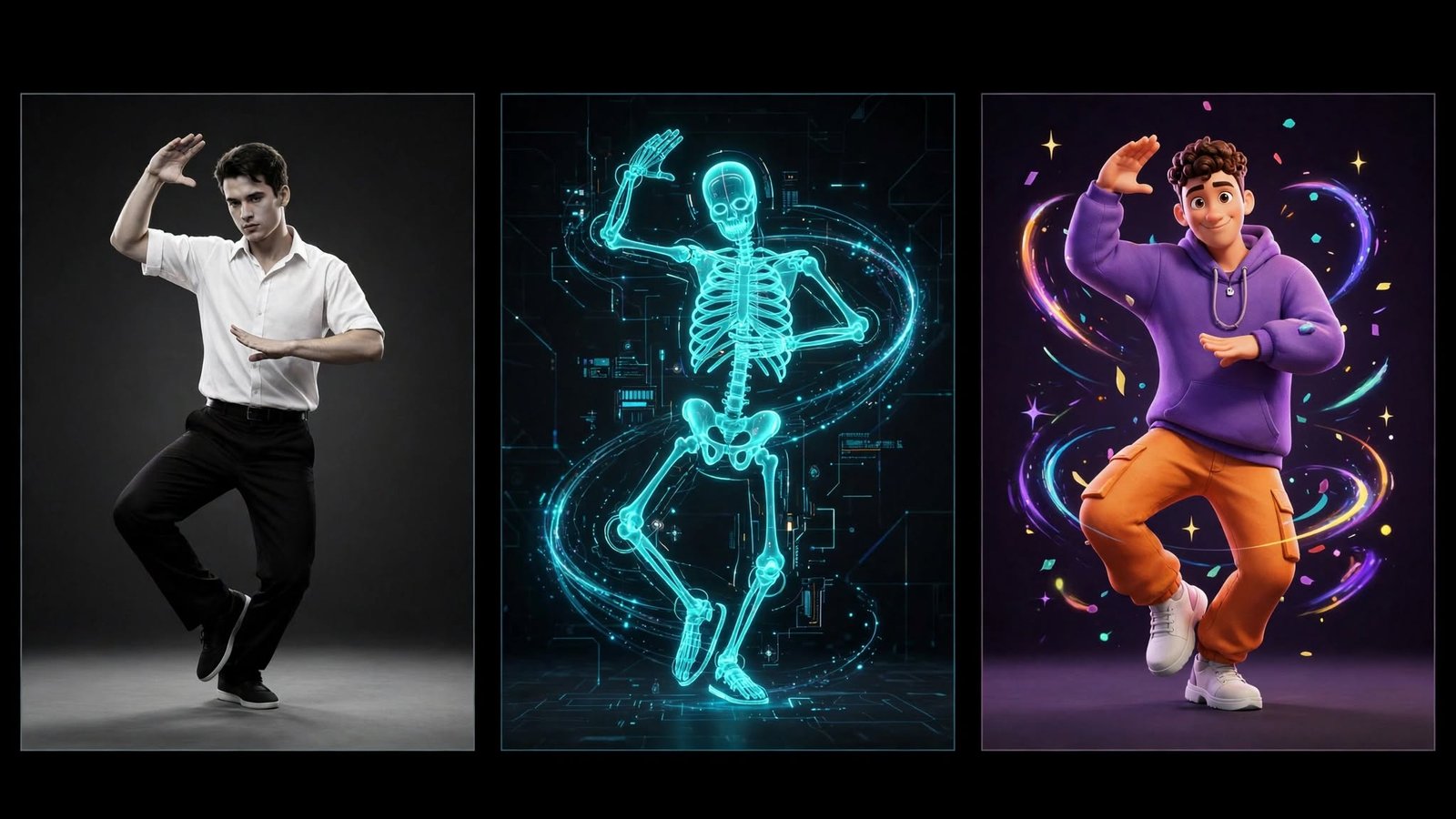
Motion Control AI Free is a popular search term for people who want to create realistic animations, transform still images into moving characters, or reproduce human movements in AI-generated videos without purchasing expensive software. These tools can help beginners, content creators, social media marketers, and digital artists produce engaging visual content with relatively little technical knowledge.
Can you use Motion Control AI for free? Yes, you can create AI-powered animations without paying by using tools that offer free credits, limited free generations, trial access, or open-source models. However, not every platform provides unlimited free video creation, and some features, such as high-resolution exports, longer clips, or watermark removal, may require a paid plan.
Understanding how motion control works and which free options suit your needs can help you create better animations while avoiding unnecessary costs.
What Is Motion Control AI?
Motion Control AI is a technology that uses artificial intelligence to guide the movement of a person, character, or object in a video. Instead of manually animating every frame, users can provide a reference video, a still image, or motion instructions, depending on the tool, and let the AI generate movement based on that input.
For example, imagine you have a portrait of a person and a short video of someone dancing. A compatible AI motion transfer tool may use the dance video to guide the person in the image, producing a new animated clip that resembles the reference movement. The result depends on the quality of the source image, the complexity of the motion, and the capabilities of the model.
This technology is useful because traditional animation often requires specialized software, considerable time, and detailed frame-by-frame adjustments. Motion control AI can simplify much of that process, making animation more accessible to people who have never worked with professional video editing tools.
How to Use Motion Control AI Free
Creating an animation with a free AI tool is generally straightforward, although the exact steps vary between platforms. Most image-based motion tools follow a similar workflow that starts with selecting a source image and ends with generating and downloading a video.
Step 1: Choose a Free Motion Control AI Tool
Start by finding an AI video generator that explicitly offers free access to image animation, motion transfer, or reference-video control. Some services provide a limited number of credits when you create an account, while others allow basic generations without payment or offer models that can run locally on suitable hardware.
Read the free-plan details before uploading your files. Check whether the service supports motion reference videos, the maximum clip duration, export quality, watermarks, and any restrictions on commercial use. A tool advertised as free may offer only a preview or a small number of usable generations.
Step 2: Prepare a High-Quality Image
Choose a clear image of the person or character you want to animate. Images with good lighting, visible facial features, a suitable body position, and a relatively uncluttered background often produce more convincing results than blurry photographs or images with important body parts hidden.
If you want to animate a full-body character, use a full-body image whenever possible. A tightly cropped portrait may work well for facial or upper-body animation, but it can limit the AI’s ability to generate natural walking, dancing, or other full-body movements.
Step 3: Select a Motion Reference
If the platform supports motion transfer, upload a reference video that demonstrates the movement you want to reproduce. This could be a person waving, walking, dancing, turning around, or performing a simple gesture.
Choose a reference clip with clear movements and minimal obstruction. Simple, well-defined actions are usually easier for AI systems to reproduce consistently than rapid spins, complicated choreography, or movements involving several people interacting closely.
Step 4: Adjust the Generation Settings
Some tools let you choose video duration, aspect ratio, output resolution, motion strength, or other generation settings. If you are creating a vertical video for short-form social media, select a portrait format when available; for a standard YouTube video, a landscape format may be more suitable.
If the platform offers a prompt field, describe the desired result in plain language. You might request natural body movement, consistent facial features, smooth transitions, and a stable background, although the final output will depend on the model rather than the prompt alone.
Step 5: Generate and Review the Animation
Start the generation process and wait for the tool to produce the video. Free services may place you in a queue, restrict the number of simultaneous jobs, or take longer to process complex movements.
Watch the result carefully before downloading it. Look for distorted hands, unnatural limbs, changes in facial appearance, flickering backgrounds, or movement that does not match the reference. If the animation looks incorrect, try a clearer source image, a shorter reference clip, or a simpler action.
Step 6: Download and Improve Your Video
Once the animation is ready, download the result if the platform allows free exports. You can then use a free video editor to trim unnecessary frames, add captions, adjust the timing, combine clips, or include background music that you have permission to use.
Keep the original generated file so that you can compare later versions and make additional edits without repeatedly spending limited AI credits. This small habit can save time and help you get more value from free tools.
Best Free Motion Control AI Options to Explore
There is no single free motion control AI tool that is best for everyone. The right choice depends on whether you want to animate a photograph, transfer movement from a reference video, create an AI dance clip, or experiment with more advanced character animation.
Free AI Video Generators
Online AI video generators are often the easiest option for beginners because they handle most of the technical work through a browser. Depending on the service and its current free plan, you may be able to upload an image, describe the desired movement, generate a short clip, and export the result without installing software.
These platforms are particularly useful for social media content, quick creative experiments, and short animated scenes. Their main limitations are usually restricted credits, generation queues, limited video duration, and premium features that may be locked behind a subscription.
Image-to-Video AI Tools
Image-to-video generators create movement from a still image, often using a text prompt to guide the scene. You might upload a photograph of a person standing outdoors and ask the AI to create a gentle walking motion or a cinematic camera movement.
However, image-to-video generation is not always the same as motion control. A tool may create plausible movement without accurately following a particular reference performance, so check whether reference-video input is supported if precise motion transfer is your main goal.
Motion Transfer and Character Animation Models
Specialized motion transfer models are designed to use movement from one video to animate a separate character or image. These tools can be more suitable for dance videos, character performances, and movement-driven creative projects because the reference motion plays a more direct role in shaping the output.
Some models are available through hosted demonstrations, while others can be downloaded and run on a compatible computer. Hosted versions may be easier to use but can impose usage limits; local models may provide greater control but require suitable hardware, installation, and more technical knowledge.
Open-Source AI Video Models
Open-source and openly available models can be attractive for users who want to experiment without paying for every generation. Depending on the model’s license, you may be able to run it locally, adjust its settings, and create multiple variations without relying on a paid online generation service.
Free software does not automatically mean a completely cost-free workflow, however. Running demanding models may require a powerful graphics card, sufficient memory, and substantial storage, while renting cloud computing resources can introduce additional costs. Always check the model’s license and hardware requirements before committing to a setup.
How to Get the Best Results From Motion Control AI Free
Getting a good animation is not only about choosing the right tool. The quality of your source image, the clarity of your reference movement, and the settings you select can make a noticeable difference in the final video.
Use Clear Images and Simple Movements
Start with an image in which the subject is easy to recognize and the body is visible enough for the intended action. If you want to create a dance animation, for example, a full-body image is usually a better starting point than a close-up portrait because the AI needs sufficient visual information to reconstruct the movement.
It is also helpful to begin with simple actions, such as waving, turning the head, walking, or raising an arm. Once you understand how the tool handles basic movements, you can experiment with more complex choreography and expressive gestures.
Choose the Right Motion Reference Video
Your reference video should show the movement you want to reproduce as clearly as possible. Good lighting, a visible subject, limited motion blur, and an unobstructed view of the relevant body parts can help the AI interpret the action more accurately.
Try to match the reference subject’s general orientation to the character image. For instance, a front-facing character may be easier to animate with a reference that also shows the subject from the front than with footage featuring rapid turns or frequent changes in camera angle.
Write Better Motion Prompts
When a tool supports text prompts, describe the action and the visual qualities you want rather than relying on vague instructions. A prompt such as “The character walks forward naturally, gently moves both arms, and maintains a consistent facial appearance” provides more useful direction than simply asking the AI to create a beautiful video.
Avoid adding too many unrelated actions to a short clip. Clear instructions give you a more manageable starting point, although a prompt cannot guarantee perfect anatomy, consistent identity, or precise movement in every generated frame.
Generate Short Clips Before Longer Videos
Short animations are often a practical starting point when using free credits. A three- to five-second clip can be enough to test a movement, identify visual problems, and decide whether your source material works well with the selected model.
If the result is satisfactory, you can create additional clips or edit several segments together. This approach helps conserve limited credits and reduces the risk of spending your entire free allowance on a complicated generation that does not meet your expectations.
Creative Ways to Use Free Motion Control AI
Motion control AI is useful for more than making photographs move. It gives creators a way to explore visual ideas, experiment with digital characters, and produce short videos without arranging a traditional filming session.
Create AI Dance Videos
AI dance videos are an appealing use case because a reference clip can provide the rhythm, gestures, and body movements for an animated character. You can experiment with illustrations, original digital characters, or suitable photographs to create entertaining content for short-form video platforms.
For better results, choose a reference with clearly visible movements and a consistent camera angle. Be aware that complex choreography may still produce distorted hands, unusual foot placement, or changes in the character’s appearance, so review the entire clip before sharing it.
Animate Portraits and Photographs
A still portrait can become more expressive when an AI model adds subtle head movement, blinking, or other facial actions. This technique can be useful for creative storytelling, digital presentations, personal art projects, and animated profile content.
The results tend to depend on the type of animation supported by the platform. Some tools specialize in facial expressions or talking portraits, while others focus on full-body movement, so choose a model that matches the effect you want rather than assuming every generator can perform every task.
Bring Digital Characters to Life
Artists can use motion control AI to animate original characters without manually creating every frame. A character designed for a game concept, illustrated story, or fantasy scene can be given movement from a suitable reference performance, making it easier to explore how the character might behave in a video.
This workflow can also help with early creative previews. Although the generated footage may not be polished enough for a finished production, it can communicate movement ideas and help artists decide which scenes deserve more detailed work.
Produce Social Media Content
Content creators can use short AI animations for Reels, Shorts, TikTok-style videos, promotional concepts, and visual storytelling. A well-chosen movement combined with a clear subject and an engaging opening can make a short clip more visually interesting than a static image.
Before publishing, check the platform’s export requirements and the AI service’s usage rules. You should also confirm that you have permission to use any reference footage, photographs, music, or recognizable likenesses included in your content.
Create Marketing and Presentation Visuals
Businesses and independent creators can experiment with animated product concepts, virtual presenters, and character-based promotional material. Motion control can be especially helpful when you want to test a visual idea before investing in a professional shoot or a more advanced animation workflow.
However, product demonstrations and commercial presentations require careful review. AI-generated motion can alter product details, text, logos, or other important features, so use the results only when their accuracy is suitable for the intended purpose.
Is Motion Control AI Free Really Free?
The answer depends on the platform and how frequently you plan to create videos. Some services provide free credits to new users, others offer daily or monthly allowances, and some allow access to selected models while reserving advanced features for paying customers.
A free allowance may be enough for occasional experiments or a few short animations, but it may not support regular content production. Credits can also be consumed more quickly when you choose higher resolutions, longer clips, or computationally demanding models.
Another important consideration is the difference between free previews and downloadable videos. Some platforms let you test a generation but restrict exports, apply watermarks, or limit the resolution available to free users.
Before committing to a workflow, check whether free credits renew, whether unused credits expire, whether a payment method is required, and whether you can download the finished video. These details will help you determine whether a tool genuinely meets your needs without requiring an unexpected purchase.
Common Problems With Motion Control AI and How to Fix Them
Even a capable AI animation tool can produce imperfect results. Understanding common problems makes it easier to improve your output without wasting too much time or using up your available credits.
Distorted Hands, Faces, or Limbs
One of the most common problems is anatomical distortion, particularly during rapid or complicated movements. Hands may appear unusually shaped, facial features can change between frames, and limbs may not follow the intended movement consistently.
To reduce these issues, use a clear source image, choose reference footage with visible body parts, and simplify the action. If the problem continues, try a different model or source image rather than repeatedly generating the same setup.
Movement Does Not Match the Reference
Sometimes the generated character moves differently from the person in the original video. This can happen when the reference is blurry, the movement is difficult to interpret, or the selected tool generates approximate motion instead of directly transferring a reference performance.
Confirm that the platform supports reference-based motion control and that you have uploaded the correct files. A shorter reference featuring one clearly visible subject can be easier to process than a crowded scene with several overlapping movements.
The Character’s Appearance Changes
Some AI models struggle to preserve a character’s face, clothing, body proportions, or artistic style throughout a clip. These inconsistencies can become more noticeable when the subject turns around, moves out of frame, or performs a complicated action.
Start with an image that clearly shows the character’s defining features and avoid references that require extensive changes in viewpoint. If identity consistency is essential, look for a tool specifically designed to preserve character appearance during motion transfer.
The Video Looks Blurry or Unnatural
Low resolution, excessive movement, and inconsistent frame generation can make an animation look less realistic. Increasing the output resolution may help with some visual details, but it will not automatically correct poor anatomy or inconsistent movement.
Instead, focus first on the quality of the source materials and the simplicity of the action. Once the animation looks stable, experiment with higher-quality settings if your chosen platform provides them within its free allowance.
Motion Control AI Free vs. Traditional Animation Software
Motion control AI and traditional animation software serve related but different purposes. AI tools can quickly turn a still image and a reference performance into a moving clip, making them useful for people who want results without learning a detailed animation workflow.
Traditional animation software offers more direct control over individual movements, timing, camera placement, and scene construction. Experienced artists can refine details that an automated generator might overlook, although producing a polished animation manually can require substantially more time and skill.
For beginners, motion control AI is often a convenient way to experiment and produce quick visual concepts. For professional projects that demand precise character movement, repeatable results, and detailed corrections, a combination of AI generation and conventional editing or animation software may be more effective.
Tips for Using Free AI Animation Tools Safely
Before uploading an image or reference video, consider how the platform stores and processes user files. Review its privacy settings and terms, especially if your source material contains personal photographs, client assets, unpublished artwork, or other sensitive information.
Use images and videos that you own or have permission to animate. A publicly available video is not automatically free to reuse, and creating an animation from someone’s likeness can raise privacy, consent, or publicity concerns, particularly when the result could mislead viewers.
You should also check the platform’s rules regarding commercial use. A service may permit free personal experiments while requiring a paid plan for business projects, advertising, or unrestricted commercial rights.
Finally, avoid assuming that an AI-generated result is automatically accurate or ready for publication. Watch the finished video, correct obvious visual errors where possible, and make sure that the content does not falsely suggest that a real person performed an action they never performed.
Frequently Asked Questions About Motion Control AI Free
Can I Use Motion Control AI Free Without Downloading Software?
Yes, some online platforms allow you to create motion-controlled animations directly in a web browser. You may need to create an account, upload a character image and a reference video, and use available credits to generate the result, but you generally do not need to install a complete animation program.
Can I Animate a Photo for Free Using AI?
Yes, many AI image-to-video tools offer limited free access for animating photographs. Depending on the model, you may be able to add subtle movement, create a walking sequence, or transfer a dance from a reference video, although advanced motion control may require more credits than basic image animation.
Is Motion Control AI Free Without a Watermark?
Not always. Some services allow clean downloads on their free plans, while others add a watermark or reserve watermark removal for paid subscribers. Check the export conditions before spending time generating a video, particularly if you intend to publish it professionally.
Can I Create AI Dance Videos Without Paying?
You can create AI dance videos without paying if your chosen tool offers enough free credits or another free usage option for motion transfer. The number of videos you can make will depend on the platform’s limits, clip duration, resolution, and the amount of credit each generation consumes.
Do I Need a Powerful Computer to Use Motion Control AI?
Not necessarily. Browser-based tools usually handle the processing on remote servers, so you can often use them on an ordinary computer with a stable internet connection. Running open-source models locally is different and may require a capable graphics card, sufficient memory, and some technical setup.
Can I Use Free AI Motion Control Videos for Commercial Purposes?
Sometimes, but the answer depends on the service’s license and terms. Some free plans restrict commercial use or provide different rights from paid subscriptions, so verify the conditions before using generated videos in advertisements, client projects, or monetized content.
Why Does My AI Animation Look Different From the Reference Video?
AI models interpret images and movement rather than reproducing every detail perfectly in every case. Poor lighting, hidden limbs, rapid movements, incompatible camera angles, and limitations in the model can all affect the result. Better source materials and simpler reference movements often improve consistency.
Final Thoughts
Motion Control AI Free makes AI-powered animation more accessible to beginners, creators, artists, and businesses that want to experiment without immediately investing in expensive software. By combining a suitable character image with a clear motion reference, you can produce short animations, dance clips, digital character performances, and creative video concepts with relatively little manual work.
The key is to choose a tool that matches your goal and understand its free-plan limitations before you begin. Focus on high-quality source images, simple reference movements, and careful review of each generation to get better results from your available credits.
You do not need a complicated animation setup to start exploring this technology. With the right workflow and realistic expectations, free motion control AI tools can provide a practical starting point for turning still images into engaging moving visuals.

1 Comment
Pingback: From Curb Appeal to Appraisal: The American Homeowner’s Guide to Choosing the Perfect Front Door